
- Install the 3CX app
- Android: https://play.google.com/store/apps/details?id=com.tcx.sipphone14
- Apple: https://apps.apple.com/us/app/3cx/id992045982
- Open the 3CX browser version and click on the QR code icon on the top right
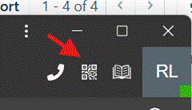
- Open the camera on your phone and scan the QR click displaying on your monitor
3CX mobile - Set up Print
Created by: Ray Lam
Modified on: Fri, 2 Oct, 2026 at 5:03 PM
Did you find it helpful? Yes No
Send feedbackSorry we couldn't be helpful. Help us improve this article with your feedback.